
Secure Online Routine: Stay Protected Without Slowing Devices
Here’s something that drives people crazy: treating security and speed like they’re opposites. Install antivirus, watch your laptop slow to a crawl. Enable a firewall, wait forever for pages to load. It doesn’t have to work that way.
The actual culprit is usually a mess of overlapping tools all fighting for the same resources. A 2024 survey showed 67% of users just turn security features off when things get sluggish. Can’t really blame them.
Why Your Security Setup Is Probably Too Heavy
Old-school antivirus programs were resource hogs. We’re talking 30% of your RAM gone during scans. Some of those early 2010s tools would basically freeze your computer every afternoon at 3pm when the scheduled scan kicked in.
Modern protection doesn’t need to work that hard. The trick is picking tools designed for efficiency instead of layering five different programs that all do roughly the same thing.
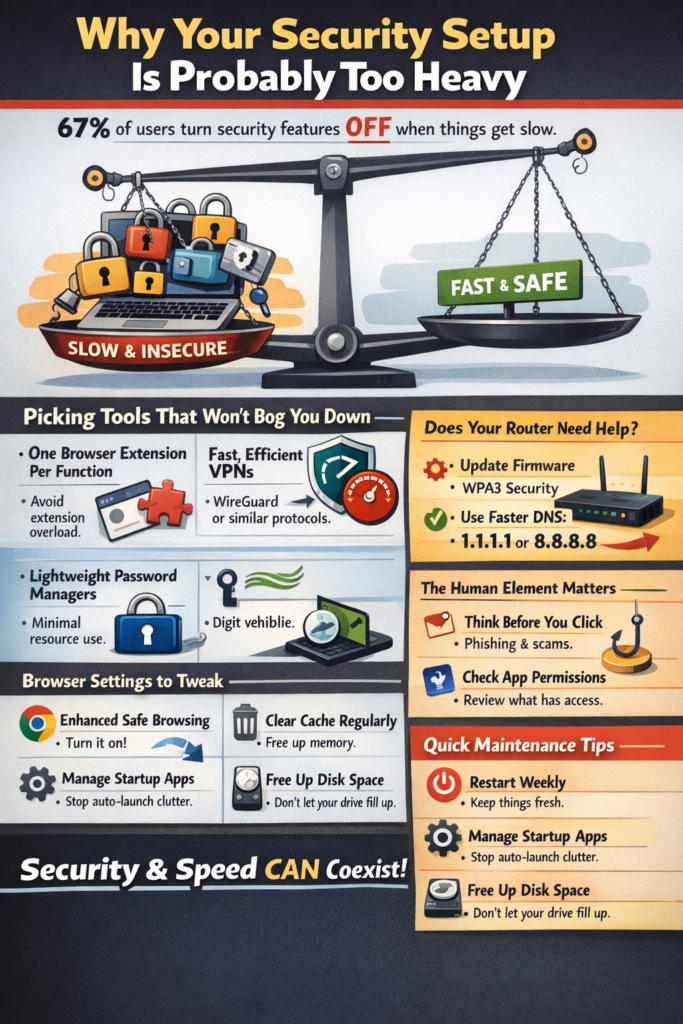
Picking Tools That Won’t Bog You Down
Browser extensions are sneaky performance killers. Running multiple ad blockers alongside a handful of privacy add-ons creates memory leaks and conflicts that slow everything down. One solid extension per function is plenty.
For keeping your connection private, fast vpn services have gotten way better than they used to be. Newer protocols like WireGuard finish their handshakes in milliseconds, not seconds. They’re also easier on phone batteries compared to older OpenVPN setups.
Password managers are another good example. They use barely any resources, and they’re definitely lighter than the mental load of remembering (and let’s be honest, reusing) the same weak passwords everywhere. Kaspersky’s research found 83% of people reuse passwords. That’s what makes credential stuffing attacks so effective.
Your Router Probably Needs Attention
When’s the last time anyone updated their router firmware? Most people never do. It takes maybe five minutes and patches security holes that attackers know about and actively target.
DNS settings are worth looking at too. Swapping your ISP’s default DNS for something like Cloudflare (1.1.1.1) or Google (8.8.8.8) can shave 20 to 50 milliseconds off every lookup. Those providers also block known malicious domains, which is a nice bonus.
If your router supports WPA3, switch to it. WPA2 still works fine, but WPA3 handles encryption more efficiently while being tougher against brute force attempts.
The Human Element Matters More Than Software
Forbes reported that human error causes 88% of data breaches. No security tool can save someone who clicks every suspicious email attachment.
Spend 10 minutes once a month checking app permissions on your phone. Apps installed years ago might still have access to your camera, microphone, and location for no good reason. Cutting those permissions helps privacy and battery life.
Keep automatic updates turned on for your OS and browser. Yeah, they interrupt sometimes. But unpatched software is still the easiest way for attackers to get in. Wikipedia’s breakdown of zero-day vulnerabilities explains why even waiting a few days to patch creates real exposure.
Browser Settings Most People Ignore
Chrome has Enhanced Safe Browsing. Firefox has Enhanced Tracking Protection. Both are solid, and most users never turn them on. These features check sites against databases of known threats and block scripts that fingerprint your browser.
Clear your cached data every month or so. Browsers hoarding three years of history and cookies can use 500MB more memory than a fresh profile. That adds up.
Try using separate browser profiles for different stuff. One for work, one for shopping, maybe a third for random browsing. Keeps tracking cookies from following you everywhere and keeps each profile running lighter.
Quick Maintenance That Actually Helps
Restart your devices weekly. Consumer hardware isn’t built like servers. Memory leaks pile up, and a fresh boot clears them out.
Check your startup programs every few months. Windows and macOS both love adding things that launch automatically and sit there eating memory. Turning off Spotify, Discord, and Adobe apps from auto-starting can cut 30 seconds off your boot time.
Keep some storage space free. Full drives can’t install updates properly. If anyone’s still running a spinning hard drive (no judgment), a fragmented disk makes antivirus scans painfully slow.
What This All Adds Up To
Today’s devices have more computing power than most people will ever need. Security shouldn’t make them feel slow.
Good configuration beats throwing money at new hardware. A five-year-old laptop running optimized tools will feel faster than a brand new machine buried in bloatware. The goal isn’t picking between security and speed. It’s setting things up so that choice doesn’t have to be made.